

RoadBook Editor
Click on the images to enlarge
Roadbook Editor – Create digital roadbooks from GPX tracks
Welcome to Roadbook Editor, a tool designed to help organizers create collaborative, non-competitive off-road events, giving proper value to the role of the co-driver.
The roadbooks created can be used with Roadbook Reader, the dedicated digital navigation app.
- Focus on navigation: unlike speed-based competitions, roadbook-system celebrates technical skill and the teamwork between driver and navigator, making the navigator a key part of successfully completing the route.
- Promotion of 4x4 events and rallies: it works as a platform for organizers and enthusiasts, helping promote events where adventure and sharing are more important than the ranking.
- Philosophy: it promotes a 4x4 approach based on enjoyment, discovery of the territory and safety, far from the extremes of the stopwatch.
The roadbooks created can be used with Roadbook Reader, the dedicated digital navigation app.
I've prepared a short video showing you how to use Roadbook Editor.
Take a few minutes and remember... you'll find the complete manual with further details in the program's Help menu.
If you think it is not working…
Warning: if you cannot insert a point or a note, in most cases it is not a malfunction. Many main functions use keyboard shortcuts and follow a precise sequence.
Downloads
New user? Read the instructions or watch the video.
Program for the organization:
Requirements:
- Windows 10/11 PC, PDF reader; printer optional.
(Contains manuals + installer)
- Current version 3.0.2 (May 11, 2026)
What changed:V. 3.0.1 Fixed an inheritance error in the points between a CAP and its destination and fixed focus error on the note being editedV. 3.0.0: In the generated PDF, the roadbook name is now present at the beginning of all pages, and page numbering has been added. (Maurizio Andreotti)
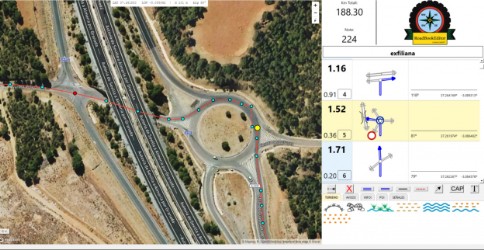
Windows PC application that allows you to create a complete roadbook starting from a .gpx file, adding navigation notes along the track.
The notes can include icons, including custom icons, to represent driving and navigation situations such as junctions, crossroads, roundabouts, multiple deviations, obstacles and landmarks.
You can generate a digital package with Ctrl+D, or simply print the generated roadbook with Ctrl+P.
Windows warning (SmartScreen):
Windows may show a warning because the program does not come from a Store. If “Windows protected your PC” appears, click More info and then Run anyway.
iOS note: due to Apple policies, we do not provide programs for Apple macOS.