

RB Ranking
Click on the images to enlarge
RB Ranking (Rankings)
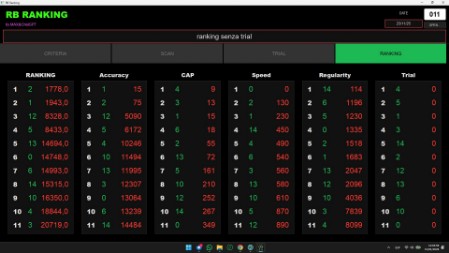
The RB Ranking program (RoadBook Ranking) is a key component of roadbook-system, designed to digitize and automate the management of 4x4 events and non-competitive rallies.
Unlike time-based systems, the ranking focuses on navigation accuracy and respect for the route defined by the organizer.
Here is how it works:
- Track monitoring: the system constantly checks that the crew follows the supplied RoadBook correctly, recording any deviations or route errors.
- Co-driver value: since the ranking does not depend on speed but on the correct interpretation of the notes, the navigator’s role becomes essential. The co-driver guides the driver towards the checkpoints or mandatory passages.
- Score assignment: the program generates a ranking based on regularity and accuracy. Crews that complete the route with the fewest navigation errors are rewarded, promoting safe and responsible driving.
- Digital integration: the software is designed to work with the other tools in the suite, allowing organizers to obtain results quickly and transparently.
In short, RB Ranking turns a simple 4x4 event into a technical navigation challenge, where teamwork between driver and co-driver is the key to climbing the ranking.
The roadbooks used are created with Roadbook Editor and used during navigation with Roadbook Reader.
In just 5 minutes,
I'll teach you how to use Roadbook Ranking!
Downloads
Program for the organization:
Requirements:
- Windows 10/11 PC, 2D scanner
Current version 2.0.3 (February 13, 2026)
Windows PC application that automatically generates rankings, which can be shown on a screen or printed.
A 2D scanner is recommended. Data can also be entered manually, but it is not practical
A 2D scanner capable of reading QR codes can be found on Amazon for less than €40.
A 2D scanner capable of reading QR codes can be found on Amazon for less than €40.
Windows warning (SmartScreen):
Windows may show a warning because the program does not come from a Store.
If “Windows protected your PC” appears, click More info and then Run anyway.
Windows may show a warning because the program does not come from a Store.
If “Windows protected your PC” appears, click More info and then Run anyway.